
Ernest Gasparyan
Candidate
Read full bio →Shareholders are invited to the Montclair Gardens Annual Meeting on Monday, May 18, 2026 at 7:00 PM ET, held virtually via Zoom. Meet the nine candidates for the Board of Directors below, cast your ballot online via the voting platform, and join us on Zoom for the meeting.
Shareholders will vote to elect members of the Board of Directors. Each candidate has shared a written bio below.
Candidate
Read full bio →Candidate
Ravi Jolly has been a shareholder at Montclair Gardens since 2011 and has served on the Board for nearly a decade, most recently as Treasurer and previously as Secretary.
He played a key role in major initiatives including lobby and basement renovations, selection of our new super and management company, and the building's digital transformation through an email listserv and website.
Ravi holds an MBA from the University of Chicago and a bachelor's degree from the University of Pennsylvania. He works at a Manhattan-based fintech startup and spends time in the apartment with his wife and two children, ages 9 and 6. He remains committed to strengthening finances and guiding future capital projects.
Candidate
Read full bio →Candidate
Russell Kenner has been living in Montclair Gardens since February 2017 and was elected to the board in 2018. He teaches math, chemistry, and physics at a Manhattan private high school and moonlights as an AP tutor.
He is proud of the progress that Montclair Gardens has made in modernizing our building and improving its structures. That remains his priority.
He is pleased with our progress and knows that more major projects must be undertaken in the near future. He will continue working towards modernizing and improving our building's efficiency while raising the sense of community through additional social events.
Candidate
Read full bio →Candidate · Apt. 120
Read full bio →Candidate
Read full bio →Candidate
Read full bio →Candidate
Read full bio →Montclair Gardens uses cumulative voting, administered online through our voting platform. Each shareholder gets a number of votes equal to the shares attached to their apartment. You can distribute those votes any way you like. Give them all to one candidate, spread them across several, or any combination, as long as you use every one of them.
Your unique access key lets you vote once. Your selections remain anonymous.
If you don't want to vote for any candidate, you can still submit a ballot that counts toward the quorum needed to hold the meeting. At the top of your ballot, select the Quorum option and assign your full allotment of votes to it. Every vote must go to either a candidate or to Quorum. A ballot with all zeros will not be accepted.
If you don't use exactly the right number of votes, the voting platform will block submission and show a red error message at the top of the page. Here are the two most common issues:

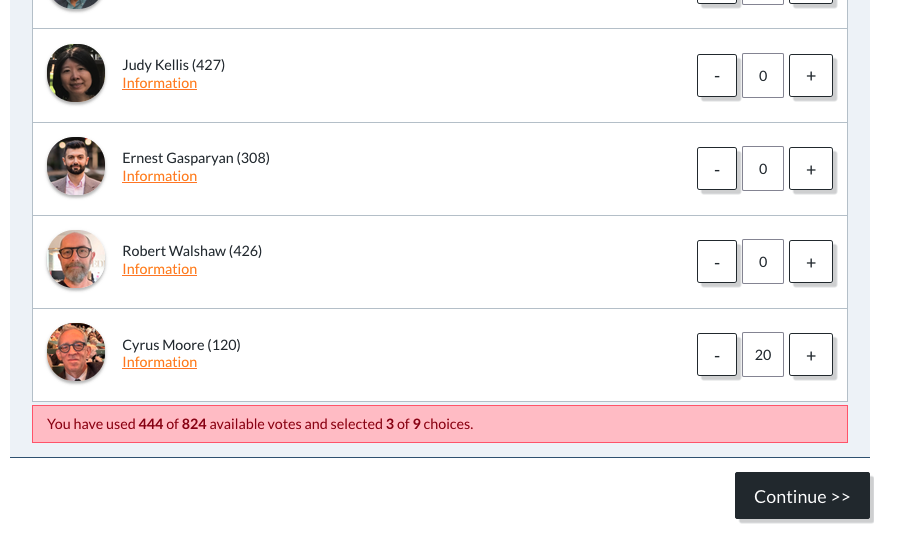
The ballot above used only 444 of 824 votes. The voting platform requires you to use all of your available votes. Add more votes to one or more candidates, or assign the remainder to the Quorum option at the top of the ballot, before submitting.

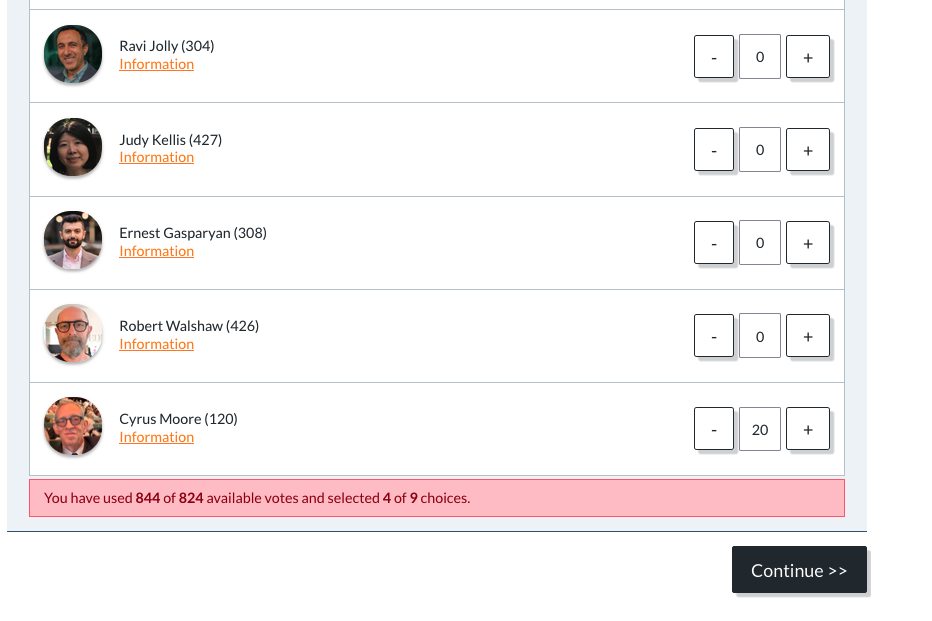
The ballot above used 844 of 824 votes, which is 20 too many. Reduce the votes for one or more candidates so the total matches your allotment exactly.
The Annual Meeting of Shareholders will be held virtually on Monday, May 18, 2026 at 7:00 PM ET. The meeting will include a shareholder vote and any other business that properly comes before the meeting.
No registration required. Just click the link on May 18.
Montclair Gardens is a pre-war cooperative residence in the historic garden district of Jackson Heights, Queens. Six stories, 113 apartments, soaring ceilings, and a shared garden at its heart. Built in 1941, and owned by its shareholders ever since.
3535 75th Street · Jackson Heights, NY 11372
Candidate Bio